In Case of Emergency - ICE
- 3.9
- Rating
- 10.00K
- Installs
- Free
- Price

 Analysis by App-foxy
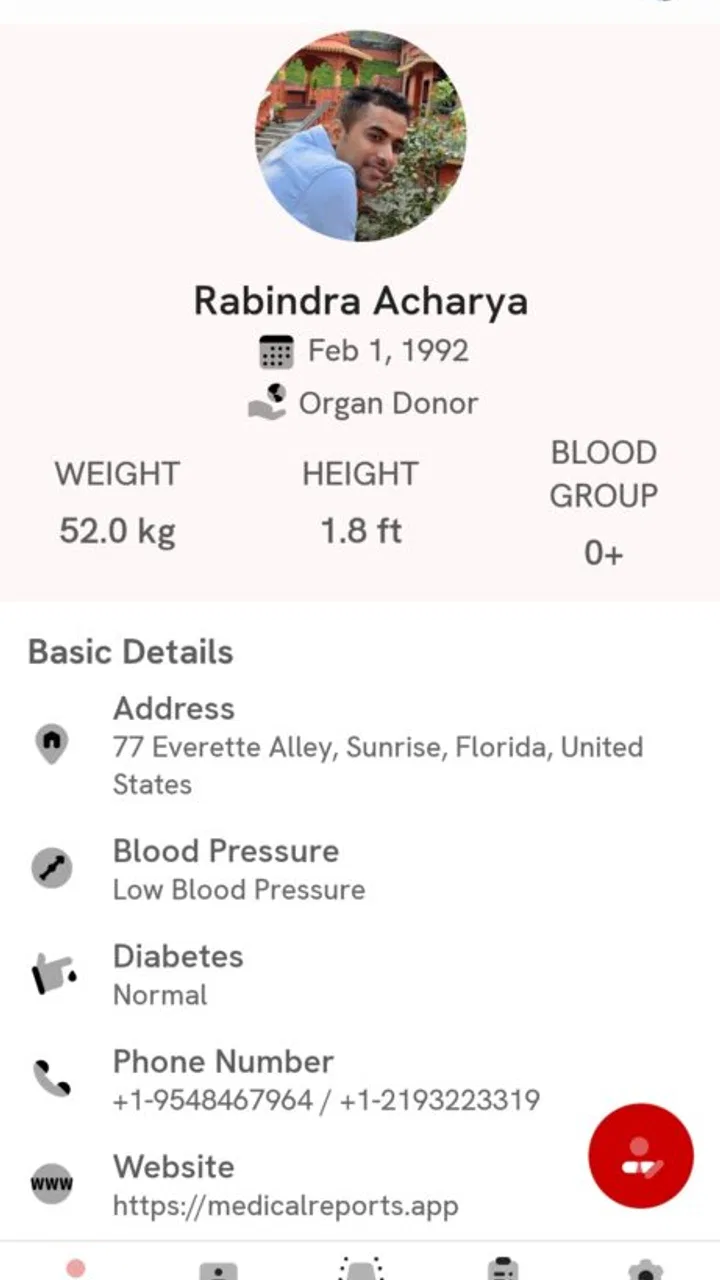
When an emergency happens, the useful information is often the information nobody can remember under pressure: a relative’s medical history, an important condition, or guidance for handling a sudden situation. In Case of Emergency - ICE takes a focused approach to that problem by combining emergency medical information with a place to track family medical history. I found that narrow purpose more meaningful than a crowded health app that tries to do everything at once.
This is a free medical app from Techxonia, LLC, available for Everyone and running on Android 8.0 or later. It has reached over 10 thousand installs and holds a 3.9 average from more than 160 ratings, with over 30 written reviews. Those figures suggest a modest but real user base rather than a widely established health platform. The current release is version 2.3.0, and optional in-app purchases range from 99 cents to $3.99 per item.
My main question while using it was not whether the idea sounded useful. It clearly does. The more important question was whether I would trust myself or a family member to find the right information quickly, and whether I would feel comfortable entering sensitive medical details. That makes this app less about daily fitness tracking and more about preparation, organization, and careful judgment.
You May Also Like

 Blood Strike: 2.5 Anniversary
Blood Strike’s Loadouts Turn Every Drop Into a Tactical Gamble
A close look at Blood Strike’s custom loadouts: how fast access to signature weapons reshapes its battle royale rhythm, rewards preparation, and narrows the gap between fights.

 Pandora - Music & Podcasts
Pandora’s Music Is Easy to Start, but Harder to Recover
Pandora’s strength is its low-effort path from a seed to a station. Its weak spot is how much confidence it asks you to place in connection, setup, and quiet recovery.

 8 Ball Pool
 Is Built on Rivalries, Rematches, and Routine
A close look at the rivalries, rematches, shared routines, and unanswered safety questions that turn a quick pool match into a persistent mobile community.

 Samsung Music
’s Quiet Strength Is Playing What You Already Own
Its reach comes less from spectacle than from dependable access to a personal library. That simplicity is both the app’s strongest retention engine and its ceiling.

 AccuWeather: Weather Radar
AccuWeather Review: A Quick, Clear Forecast for Everyday Decisions
For everyday plans, the best forecast is the one you can understand quickly. AccuWeather makes rain timing, radar, and local conditions easy to act on, with a few trade-offs.

 Hill Climb Racing
Why Hill Climb Racing Still Turns Crashes Into One More Run
A tiny car, a bumpy hill and one more upgrade: Hill Climb Racing keeps resurfacing because its simple chaos makes every near-miss feel personal.
More From Our News Desk
View All News


What the emergency focus means in everyday use
The app is built around two related tasks. The first is presenting medical information for emergency situations. The second is helping you keep track of family medical history. These jobs overlap, but they are not identical. Emergency information needs to be brief and easy to find, while family history usually needs more context and gradual updating.
I think the strongest use case is a household where several people need to remember different details. A parent may want to organize information about children, an adult child may be helping an older relative, or a caregiver may need a central reference before a medical appointment. Instead of relying on scattered notes, messages, and memory, the app gives this information a dedicated home.
A realistic example would be preparing for a weekend trip with a family member who has a complicated medical background. Before leaving, I would review the relevant history, check that it is current, and make sure the phone is accessible. If something unexpected happened, the app could help me recall information that might otherwise be incomplete. It would not replace a clinician or emergency service, but it could reduce the confusion that comes from trying to reconstruct a person’s history in a stressful moment.
That distinction matters. I would treat the app as a personal reference tool, not as a diagnostic system or a substitute for professional care. Emergency instructions should never delay contacting local emergency services, and a family history record should not be mistaken for a medical assessment. The app’s value is in preparation and recall, not in making decisions that require a trained professional.
Why the family-history side deserves regular attention
Family medical history is easy to postpone because it rarely feels urgent while everyone is well. The practical advantage of recording it is that you can work on it during calm moments. I would start with the relatives and conditions I know confidently, then revisit the record after conversations with family members or after finding information in older medical paperwork.
One useful habit is to separate confirmed details from memories that still need checking. Even when an app makes information easier to store, the quality of the record depends on the person entering it. A vague recollection can be less helpful than an openly incomplete record that you later verify. I would also review spelling, dates, and relationships after adding information, because small errors can make a history confusing when someone else is reading it quickly.
Another practical workflow is to update the record after a major appointment rather than waiting for an annual cleanup. That keeps the information closer to reality and reduces the chance that an old condition or outdated detail remains prominent. The app is most useful when treated as a living reference, not as a one-time form that is completed and forgotten.
Trust begins with the information you choose to enter
Medical information is unusually sensitive, so I would not install this kind of app casually and immediately fill every field. I would first look through the visible screens, understand what information the app asks me to provide, and decide whether each entry is genuinely useful for my situation. The safest starting point is a small, accurate record rather than a large record built from guesses.
The app’s purpose makes data sensitivity unavoidable: emergency details and family history are personal by nature. That does not automatically make the app unsuitable, but it does change how I would use it. I would avoid entering information simply because a field exists, and I would be especially careful with details about relatives who have not agreed to share them.
I would also consider who may be able to access the phone itself. A medical record stored on a shared or frequently unlocked device has a different privacy profile from one kept on a personal phone. That is a basic but important trade-off: convenience during an emergency can conflict with the desire to keep sensitive details private.
Because the app is free to download but includes optional purchases, I would review any purchase screen before confirming it. The listed range is from 99 cents to $3.99 per item, so the cost is relatively easy to understand, but price is only one part of the decision. I would want to know what an optional item changes for my workflow and whether I actually need it before paying.
What I would check before relying on it
I would test the app while calm rather than waiting for an emergency. That means opening it from the normal phone screen, moving through the medical information area, and confirming that the family-history record is understandable. If the information takes too many taps to locate, I would reconsider how much confidence to place in it during a crisis.
I would also ask whether another trusted person could understand the entries without an explanation from me. A record that makes sense only to its creator is less useful when a relative, caregiver, or responder needs to consult it. Clear wording and consistent organization matter more here than decorative design.
After setting up a record, I would close and reopen the app to make sure I can return to the same information without hesitation. I would repeat that check after a major update or after changing the phone’s settings. Version 2.3.0 is the current release, but any app can change its layout over time, and emergency preparation should include checking that familiar actions remain familiar.
I would not assume that having the app installed means the information is automatically available in every possible situation. Battery life, a locked device, a damaged phone, or a person who does not know where to look can all reduce usefulness. For an important family record, I would keep a separate, sensible backup plan that follows the family’s privacy preferences.
Visible choices and personal control
The most important form of control here is deciding what to record and when to update it. I prefer that approach to an app that tries to infer a health profile from unrelated activity. With a focused emergency tool, I can think deliberately about what a family member may need to know and leave out details that do not belong in a quick reference.
That control also means accepting responsibility. If a condition changes, an old entry can become misleading. If a relative’s history was entered years ago, it may no longer reflect what the family knows today. I would schedule a simple review after major medical events and whenever a new family detail becomes reliable.
I would be cautious about sharing the phone or showing the record in public. Even without discussing technical storage behavior, the information is still sensitive because it appears on a personal device. I would use the app in a way that matches the family’s expectations, and I would not copy someone else’s medical history into it without thinking about consent and necessity.
For a caregiver, the question is slightly different. The app may help organize information, but the caregiver should agree with the person whose history is being recorded about what belongs there and who may see it. That conversation can prevent a useful tool from becoming a source of tension inside the family.
Where it compares well with ordinary alternatives
The usual alternatives are paper notes, a phone note, a message thread, or a general cloud document. Paper is easy to understand and does not depend on an app interface, but it can become outdated or difficult to carry. A phone note is quick for one-off information, though it may mix medical details with shopping lists and other unrelated content. A message thread can involve several relatives, but finding the right detail later is often frustrating.
This app’s advantage is its dedicated medical purpose. The emergency focus gives the information a clearer home than a general notes application, while the family-history element encourages a longer-term record instead of a single isolated reminder. That separation can make preparation feel more intentional.
The trade-off is that a dedicated app becomes another place to maintain. If your family already has a carefully managed medical document that everyone can access and understands, moving everything may not improve your routine. A general notes app may also be better for someone who wants flexible formatting, broad sharing, or one system for medical and nonmedical records.
I would choose this app when the main problem is remembering and organizing family medical information in a medical-specific setting. I would skip it if I am looking for appointment booking, medication reminders, fitness tracking, telehealth, or a complete patient portal. Its focused scope is a strength only when that scope matches the problem I am trying to solve.
Practical setup habits that improve its usefulness
Begin with the information most likely to matter in a real emergency, and use plain language that another person can understand quickly.
Review each family entry after learning something new, rather than assuming an old record remains accurate forever.
Ask a trusted family member to find the important information while you watch; this reveals whether the organization works for someone other than you.
Check the app after an update and before travel, especially if you have not opened it for several months.
Think about device privacy before entering sensitive details, particularly on a phone used by more than one person.
These steps are not flashy features, but they address the difference between owning an emergency app and actually being prepared. The app can organize information; it cannot ensure that the information is correct, accessible, or understood by the people who may need it.
Who should use it, and who should look elsewhere
I can recommend it most easily to families that want a dedicated place for emergency medical information and family history without committing to a larger health-management platform. It may also suit people who are beginning to collect family medical details and want a more purposeful structure than a blank note.
I would be more hesitant for users who need a formal clinical record, direct communication with healthcare providers, or advanced sharing controls. Those needs belong to a patient portal, a clinician-approved system, or another service designed specifically for professional care. I would also hesitate if a user is uncomfortable placing sensitive information on a smartphone at all; no convenience is worth ignoring a personal privacy boundary.
The modest 3.9 average from over 160 ratings gives me a balanced impression. It is enough to show that people are using the app and forming opinions, but not enough for me to treat it as universally proven. The more than 30 written reviews can be useful for spotting recurring usability concerns, yet I would still test the workflow personally because emergency readiness depends heavily on individual habits.
Its Everyone age rating makes the app broadly approachable, but younger users may still need an adult’s help deciding what health information is appropriate to record. The rating describes accessibility, not medical suitability for every situation. A family should decide together how the tool fits into its own care routine.
My cautious verdict after weighing usefulness and trust
In Case of Emergency - ICE has a sensible, specific purpose. I like that it concentrates on emergency medical information and family history instead of pretending to be an entire healthcare system. In my experience, that focus makes it easier to understand why I would install it: not for daily entertainment or constant tracking, but to prepare information before it is needed.
I would use it as one layer of preparation, alongside professional medical advice and a family conversation about access. I would keep entries accurate, avoid unnecessary sensitive details, and check that a trusted person could navigate the record. Those habits are essential because the app’s usefulness depends more on the quality and accessibility of the information than on simply having it installed.
The main friction is maintenance and trust. A medical record must be reviewed, a phone may not always be available, and a dedicated app may not suit families that already have a better-organized system. Optional purchases also deserve a deliberate look before spending, even though the app itself is free.
My final recommendation is cautious but positive: try it if your household needs a focused emergency reference and a place to build family medical history over time. Do not choose it as a replacement for emergency services, clinical records, or professional care. Used with realistic expectations and careful control over what you enter, it can turn scattered family knowledge into something easier to consult when remembering everything is hardest.
FAQs for In Case of Emergency - ICE
01What is In Case of Emergency - ICE, and what is it used for?
In Case of Emergency - ICE is designed to keep essential emergency information accessible when it matters most. You can store details such as emergency contacts, medical conditions, allergies, medications, blood type, and other personal notes. The app is particularly useful if you are unconscious, unable to speak, or being assisted by someone who needs important information quickly.
02Can emergency responders access my information if my phone is locked?
The main purpose of an ICE app is to make selected emergency details available without requiring a full phone unlock, although the exact behavior depends on the app version, device model, and your lock-screen settings. Before relying on it, configure the emergency display carefully and test it from the locked screen. Do not assume every field will automatically be visible.
03What information should I add to my ICE profile?
A useful ICE profile should include your full name, emergency contacts, important medical conditions, severe allergies, current medications, blood type if known, and any critical instructions for first responders. You may also add your doctor’s details or insurance information where appropriate. Avoid entering inaccurate or outdated data, and review the profile regularly after medical or contact changes.
04Does In Case of Emergency - ICE share or protect my personal information?
Because the app may contain sensitive medical and contact information, privacy should be considered before installation and setup. Review the application’s current permissions, privacy policy, and data-handling disclosures in the official app store. Only enter information you are comfortable storing on your device, keep your phone protected, and remove details that are no longer necessary.
05Is In Case of Emergency - ICE a replacement for calling emergency services?
No. In Case of Emergency - ICE is an information and preparedness tool, not a replacement for emergency services, medical advice, or a personal safety plan. It can help others understand your situation and contact trusted people, but it cannot guarantee assistance or automatically solve an emergency. Keep local emergency numbers available and seek professional help whenever necessary.
Pros
- Quickly displays emergency contacts and essential medical information.
- Can help first responders identify allergies
- conditions
- or medications.
- Useful even when the phone is locked
- depending on device settings.
- Simple interface makes important details easy to find under stress.
- Supports preparedness for accidents
- travel
- and everyday emergencies.
Cons
- Information must be entered and kept updated by the user.
- Emergency features may vary across Android versions and devices.
- It cannot replace calling emergency services or receiving medical care.
- Privacy may be a concern when sensitive health details are stored on a phone.
- Some features may require proper lock-screen permissions to work reliably.

In Case of Emergency - ICE
Gallery